

Xero vs QuickBooks Online 2026: Executive Summary
The ongoing debate of Xero vs QuickBooks Online 2026 is more than a feature shootout—it’s a deep evaluation of technical complexity, real-world workflow fit, integration with contemporary SaaS stacks, and post-pandemic automation readiness. This comprehensive showdown unearths not just who leads “on paper,” but which accounting suite shows flexibility for scaling, integrating, and future-proofing medium-to-large businesses into 2026 and beyond.
Xero: Technical Capabilities and Platform Analysis
Xero has doubled down on robust API coverage and globalization, aiming to be the de facto ledger for distributed, tech-native finance teams. Its interface remains clean, but there is more under the hood in 2026 than most first-impression reviews capture.
Integration and Technical Friction
- API Ecosystem: Xero’s public API is RESTful, widely documented, and handles high-volume syncs (up to 10 calls/sec per endpoint) but imposes rate limits that can stall bulk batch jobs, especially when migrating high-frequency transaction histories from legacy ERPs.
- Onboarding and Data Migration: New users face friction syncing historic payroll data or multi-currency transactions. Xero’s import tools lack deep, field-level mapping granularity—a common choke point for enterprise IT teams.
- App Marketplace: 2026’s Xero App Store is among the largest in the ecosystem, but not all third-party integrations are parity-matched with QuickBooks (notably Salesforce and Amazon Seller Central have more limited native workflows).
Feature Workflow Breakdown
- Bank Feeds: Connects over 18,000 financial institutions internationally. Real-time sync runs hourly; manual intervention is sometimes needed for two-factor authentication or when third-party bank APIs break during updates.
- Automation: Xero’s “Repeating Invoices” and “Recurring Bills” auto-send/remind vendors and clients. Custom rules for transaction categorization work well for standard expenses, but edge-cases (complex accruals) require manual override.
- Reporting: Dashboards are visually tight; however, custom report building requires moderate spreadsheet literacy to extract non-standard views (e.g., multi-entity consolidation, segment-by-region).
Key Trade-Offs for Businesses
- Simplicity vs. Customization: Xero is faster for routine users. Advanced configurations, such as granular user permissions, are less flexible than QuickBooks Online—especially for enterprises with matrix reporting lines or delegated finance roles.
- Local Compliance: Xero’s international tax compliance engine is unmatched, but U.S.-centric payroll lags behind QuickBooks.
2026 and Beyond: AI and Future-Proofing
- AI-Driven Automation: 2026 beta features include automated document ingestion, regex-based line item matching, and predictive cashflow with variable scenario planning. Accuracy is high for simple vendor bills, but user review is still required for irregular contracts or M&A activity.
- Security: Xero is rolling out seamless OAuth2 SSO for all integrations and migrating to quantum-resistant encryption by late 2026 to satisfy stricter GDPR and APRA standards.
QuickBooks Online: Technical Depth and Operational Impact
While Xero aims for global reach, QuickBooks Online corners the American SMB and mid-market, with deeper integration to the U.S. banking, payroll, and tax environment. In the “Xero vs QuickBooks Online 2026” landscape, QuickBooks continues to court power users who want all-in-one control with minimal third-party dependencies.
Integration and Onboarding Challenges
- API Limitations: QuickBooks’ API endpoints are more restrictive, especially regarding inventory management. Developer support is tightly coupled with “sandboxed” environments, frustrating teams with complex chain integrations (CRM, inventory, payments).
- Data Migration: QuickBooks conversion tools are precise within its ecosystem, but those switching from SAP/Oracle often face significant field-loss or manual fixing for custom journal structures and class tracking.
- Embedded Apps: The native QuickBooks Online App Store lacks the international depth of Xero, benefiting instead from U.S.-first enhancements (e.g., payroll direct deposit, tax e-file), but less robust in global contexts.
Feature Workflows in Practice
- Invoicing & Payments: QuickBooks’ automated payment chasing workflow integrates directly with bank reconciliation—each invoice auto updates status without manual matching. Invoice customization is more robust (custom fields, branded layouts) than Xero.
- Expense Management: AI scanning for receipts works near-flawlessly with QuickBooks. Auto-categorization for common U.S. tax rules saves hours per month. Multi-approval expense chains, however, still rely on third-party add-ons.
- Reporting & Dashboards: Out-of-the-box reporting is granular: profit/loss by class, location, product line. Power users can schedule auto-run custom reports that deliver to stakeholders via encrypted email.
Hidden Trade-Offs
- Power vs. Portability: QuickBooks packs more into the base platform, but its workflow design (and interface) can feel bloated compared to Xero’s minimal approach—slower for non-accountants or small startups.
- Locked Ecosystem: Deeper features mean stronger vendor lock-in; businesses growing beyond Intuit offerings (or expanding globally) may need a costly and complex migration later.
AI, Automation, and Future Evolution
- AI-Boosted Reconciliation and Forecasting: New “SmartCash” modules leverage transaction patterning to forecast liquidity and alert to atypical spending events. These tools are still U.S.-centric and may not reflect multi-entity operations abroad.
- Compliance Trajectory: QuickBooks is adding real-time tax law updates, but primarily for U.S. federal and state regulations—international expansion lags behind Xero.
Key Differences: Side-by-Side Breakdown
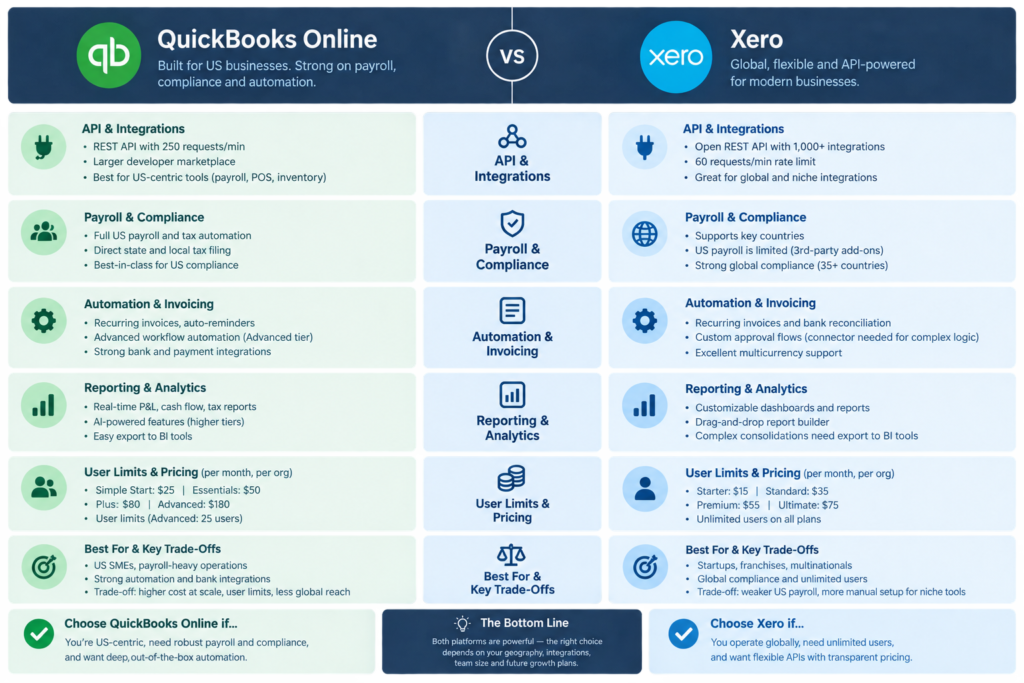
| Feature/Factor | Xero | QuickBooks Online | Best For | Tech Limitations | Pricing (2026 USD/month) |
|---|---|---|---|---|---|
| APIs & Integrations | Open REST API, top international coverage, but slower bulk migrations | U.S.-focused APIs, faster intra-ecosystem import but less depth for non-U.S. | Distributed/global teams | Pace of batch data sync | $15–$80 (tiered) |
| Automation Scope | Recurring billing, AI doc matching, moderate U.S. payroll rules support | Auto-categorize, advanced invoice tracking, U.S. payroll native | U.S.-based businesses | Global payroll coverage | $18–$100 (plus add-ons) |
| User Experience | Minimal, easy for new staff, fewer dashboards | Feature-packed, steeper learning curve, more dashboards/reports | Firms with in-house finance pros | Advanced report config | Varies by user count |
| Scalability | Handles multi-entity, global currencies | Multi-company only with add-ons | International growth | Limited by add-on dependency | Extra for multi-currency |
| Future AI Features | Predictive cashflow, quantum encryption transition | U.S. tax AI, smart spend alerts | Compliance-heavy firms | AI still beta/stable | AI included at premium tiers |
User Interface & Ease of Use (Xero vs QuickBooks Online 2026)
When measuring “Xero vs QuickBooks Online 2026” in terms of UX, the choice boils down to who is using the system—and how often.
- Xero: The dashboard is intentionally simple—clear bank feed snapshot, recent bills/invoices, and key KPIs. Drag-and-drop bank reconciliation is genuinely faster for day-to-day operations, but lacks deep workflow shortcutting for non-routine entries.
- QuickBooks Online: The main dashboard is information-dense, favoring heavy users and accountants over occasional users. You can customize dashboard widgets, set role-based menus, and “star” reports and filters, but the UI can overwhelm less experienced staff.
Technical Friction:
- Xero: Training new users is easier, but customizing the UI (dashboards, sidebars, report layouts) is limited, so power users may feel hemmed in.
- QuickBooks: Highly flexible; almost every view or report can be tweaked, but onboarding takes longer and the interface can be cluttered without admin curation.
Workflow Trade-Offs: QuickBooks suits established finance teams who want everything visible at once. Xero serves teams who prize clarity and focus but may sacrifice deep reporting shortcuts.
Looking Ahead (2026-2028): Both platforms are deploying AI-based onboarding “assistants” that observe user patterns to recommend UI customizations. Long-term, expect accounting dashboards that auto-adapt to department usage and seasonality, trimming or surfacing features according to behavioral analytics.
Invoicing & Automation Features
The invoicing and automation battleground for Xero vs QuickBooks Online 2026 boils down to detail orientation, configurability, and integration with payment or approval stacks.
- Xero – Invoicing:
- Simple invoice generator supports multi-currency, customizable payment terms, and “pay now” links for Stripe/PayPal.
- Recurring invoice engine can attach contracts and auto-fire reminders at customizable frequencies (daily, weekly, monthly).
- Downside: Custom approvals, multi-layer signoff rules, and advanced field mapping require third-party plug-ins.
- QuickBooks Online – Invoicing:
- Supports extensive branding, custom fields (SKU, salesperson), and US-compliant e-invoice protocols out of the box.
- Invoice-to-cash automation is tight: status auto-updates from invoice to payment with granular tracking by region, class, or user.
- Limitations: For international invoices or highly customized local tax schemas, more manual setup is needed.
- Automation Tools:
- Xero: Scheduled bill pay, auto-reconciliation, document extraction, basic transaction rule logic.
- QuickBooks Online: Automated expense categorization, rule-building for vendor payment sequences, real-time ACH tracking, AI anomaly detection.
Trade-Offs: Xero is a win for international, recurring, or simple invoice/expense automation. QuickBooks delivers more granular, tailored automation and approvals for U.S.-centric firms that demand end-to-end visibility and automation within their workflow.
AI and Automation Trends (2026): AI-powered invoicing—which predicts late payers, schedules discounts, and reconciles anomalies automatically—will continue to move from premium to standard tier tools throughout 2026, but both platforms require human oversight for non-standard contracts or bulk-billed clients.
Pros and Cons: Xero vs QuickBooks Online 2026
- Xero Pros:
- Simplified global accounting compliance out of the box
- Extensive API library and large app ecosystem for international SaaS integration
- Faster onboarding for new staff, easy bank reconciliation, predictive AI features coming to all tiers
- Xero Cons:
- Payroll and U.S.-style tax automation lag behind QuickBooks for American users
- Customization and in-depth reporting options can become frustratingly limited
- Data migration friction for those used to on-premise or highly customized systems
- QuickBooks Online Pros:
- Deepest & most granular U.S. tax, payroll, and e-invoice support
- Highly flexible dashboard and workflow customization for power users
- Superior out-of-the-box automation chains for invoice-to-cash, tax e-file, and transaction review
- QuickBooks Online Cons:
- Interface is crowded, steep learning curve for non-accountants
- Vendor lock-in risk and limited global payroll/multi-currency unless purchasing add-ons
- API rate limits and data migration tools are less robust for complex imports from non-Intuit systems
Hidden Costs: Both platforms offer entry-level prices, but core features (multi-entity, advanced AI, payroll, premium integrations) ramp up monthly costs, typically adding $25–$50/user/month in real midsize deployments—especially with external consultant time for post-migration tuning.
Final Recommendation: Which Wins in 2026?
Xero vs QuickBooks Online 2026 is ultimately a question of organizational fit, not a binary winner-loser. For single-entity, U.S.-centric businesses that crave granular workflow tweaks, QuickBooks Online retains its advantage. For global or remote-first teams, or those that value predictable interfaces and a flexible API marketplace, Xero is the safer, more scalable bet for 2026 deployment.
Expect both vendors to push additional AI-driven automation and scenario-building, but hidden integration or migration costs will strongly favor platforms that fit your existing stack and geo-expansion plans now. Independent IT, finance, and operations leaders must evaluate not just features—but also the organizational costs of technical debt, staff retraining, and migration.
2026 Playbook:
- Select QuickBooks if your primary risk is U.S. tax or payroll complexity, you want built-in workflow automation, and most of your finance staff are power users.
- Opt for Xero if you prioritize clean UX, fast global deployment, and flexibility in connecting into a rapidly evolving SaaS stack—notably for distributed, multi-currency operations.
No matter the platform, the real winners in 2026 will be those who plan for growth, budget for change-management headaches, and leverage AI where it amplifies—not just replaces—your financial team’s judgment.
A deep dive comparison of Xero vs QuickBooks Online. Discover hidden fees, key feature differences, and which platform wins for usability.